

webomat

Website for a language school

from $29

Paste the address of your school’s current website. An AI agent reads your courses, levels, timetable, prices and teacher profiles, then designs and codes a new site where a student can match a course to their level in a few minutes and sign up for a placement test.

A short chat and a free preview of your new website. No card needed.

No website yet? Tell us what you need - we’ll build it →

  • First homepage version free
  • Usually ready in 15–25 minutes
  • Hosting and SSL for a year included

English version of a real Webomat project

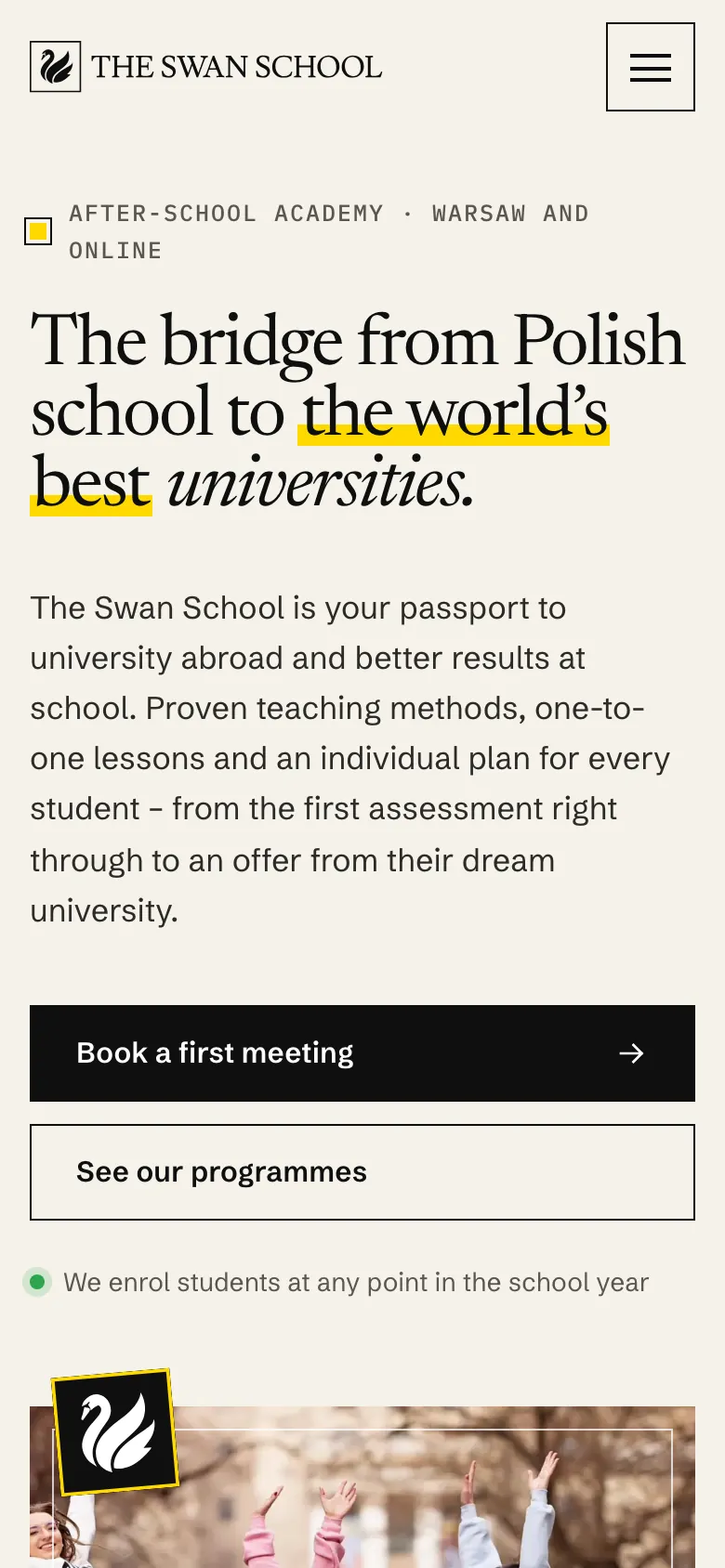
The Swan School (theswanschool.edu.pl) in Warsaw prepares students for university abroad. The agent designed and coded its new website; this is the site translated into English. See the website live →

What to look for

What a good language school website needs

A prospective student usually knows what they want: English for work, an exam prep course, classes for their child. Your website should quickly show them which course fits, when it starts and how much it costs.

Sample website of The Swan School on a phone
  1. Courses organised by level and goal

    CEFR levels (A1–C2), age groups and goals: children, teens, adults, exam preparation, conversation, business language. Students find their course faster by level than by a name like “Intensive Plus”.

  2. Format and location

    In person or online, group or one-to-one, how many students per group, at which branch. If you have several locations, give each one with directions, because for many people the distance from home or work decides it.

  3. Placement test sign-up in one click

    A button on the first screen leads to a short form: language, approximate level, preferred days and times. The request goes to your dashboard and the school’s inbox, and the office calls back to arrange a test or a trial lesson.

  4. Timetable and group start dates

    Class days and times, term length, the start date of new groups and whether students can join mid-course. The timetable written as text in a table that fits a phone screen, not a scan of a printed schedule.

  5. Prices and what they include

    Price per term, course or lesson, lesson length (45 or 60 minutes), whether the coursebook is included, instalments and discounts if you offer them. The agent won’t make prices up: it carries over the ones on your site, or you add them in the chat.

  6. Teachers by name

    Who teaches, which languages and for how long, with a real photo. Students and parents want to know who they will spend several hours a week with. The agent describes your team using what is on your current website, without adding qualifications.

  7. Exams you prepare students for

    School-leaving exams, Cambridge (for example B2 First, C1 Advanced), IELTS, TOEFL, DELE, Goethe or DELF. Give your exam centre status or accreditation with the name of the awarding body; the agent won’t add them if they are not in your materials.

  8. What lessons are like

    Method, coursebooks, homework, contact with parents and progress updates. A few sentences about what a lesson really looks like set you apart better than a slogan about “modern methods”.

  9. Corporate training

    If you run courses for employees, a separate page covering formats (on site, online), progress reporting and invoicing. HR teams look for this information before they send an enquiry.

  10. A page for every branch and language

    Students search Google for “German classes” plus a city or neighbourhood. A separate page for each language and location, with the address, office hours and structured data, helps your site show up for searches like that.

  11. Contact and office hours

    Language school offices often work afternoons and evenings, so the hours have to be visible. A tap-to-call number, email, address and a form on every course page.

Common problems

What usually goes wrong on old language school websites

Students compare several schools in one evening. If they can’t find the level, start date and price on your site, they don’t call to ask. They open another tab.

  • Old site

    Courses as a list of names

    “General English”, “Business”, “Intensive”, with not a word about level, student age, number of hours or class days. The agent turns a list like that into course descriptions with level, format and dates, as long as the information is on your site or you give it in the chat.

  • Old site

    Last term’s timetable as a PDF

    A schedule uploaded as a scan or a wide table that can’t be read on a phone. On the new site the timetable is text, and you paste the new term into the chat or attach it as an Excel spreadsheet.

  • Old site

    A form with no word on what happens next

    A single “message” field and a “send” button. The student doesn’t know whether anyone will call back, or when. The new form can ask about language, level and convenient times, and next to it you can say when the office calls back. Just mention it in the chat.

  • Old site

    Prices only “on request”

    A student who can’t see even an approximate price often assumes it’s expensive and picks a school that shows its prices. If you can give at least a “from” price, the new site shows it next to the course, in a table that reads well on a phone.

What you get

What the agent builds for a language school

The agent builds the site from the courses your school has already described. Below is a typical layout; courses missing from your site today, such as a new exam prep course, you add in the chat.

  1. /

    Homepage

    Which languages you teach and where, a placement test button, the next group start dates.

  2. /courses.html

    Courses

    Courses by age and level (A1–C2), and for a bigger offer separate pages, for example English for children or a B2 First prep course.

  3. /timetable.html

    Timetable and prices

    Group days and times, hours per term, prices and payment terms, if you provide them.

  4. /teachers.html

    Teachers

    Your team by name, languages, experience and the photos you provide.

  5. /exams.html

    Exams

    The exams you prepare students for, exam course dates and how to sign up.

  6. /contact.html

    Placement test and contact

    A sign-up form for a placement test or trial lesson, branch addresses with directions, phone and office hours.

On every page

  • Tap-to-call phone number
  • Mobile-friendly
  • Titles and descriptions for Google
  • schema.org structured data
  • Sitemap
  • 301 redirects

The $29 package covers up to 10 pages. With a wide range of courses, consider a package with 25 or 50 pages and give each course its own page. Old URLs are redirected (301) to the new ones.

How it works

From old website to new - step by step

No briefs, meetings or weeks of waiting. The agent works with your real content, and you decide at every step.

  1. Step 01

    Snapshot and mini audit

    Paste the address and within a minute we capture your current site on desktop and mobile, count the pages and check SSL, speed and the mobile version. Free.

    ~1 min

  2. Step 02

    The agent reads your website

    It collects your real content, photos, logo and brand colours, recognises your industry, services and contact details - and never makes anything up.

    2-3 min

  3. Step 03

    Proposals in different styles

    You get 1, 3 or 5 homepage versions, each in a different direction: classic, bold or light. Pick the one that suits your business best.

    15–25 min

  4. Step 04

    Coding the full website

    The agent builds the subpages in the chosen style, connects the navigation and redirects old addresses (301) so you keep your Google rankings.

    usually 15–20 min

  5. Step 05

    Quality control

    Automated tests on mobile and desktop: nothing overlaps, links work, the site is light and accessible. The agent fixes issues before you see anything.

    on every version

  6. Step 06

    Changes and publishing

    Request changes in a chat - each one is a new version you can roll back. Connect your own domain with SSL or download the site as an HTML package.

    a revision takes ~10 min

Pricing

A full website for one fixed price

One package covers homepage proposals, building the full website and revisions. No hourly rates, no extra charge per page up to the limit.

Net prices, 23% VAT is addedGross prices, 23% VAT included

Full website — 1 version

One direction, polished straight away

$29$35.67netgross

$35.67 gross$29 net + 23% VAT

Get started
  • 1homepage version

  • 10pages

  • 3revision rounds

  • 5AI photos

  • SEO and GEO optimisation, 301 redirects
  • Revisions in a chat, in the same style
  • ZIP package to download

1 year free

  • Website hosting and maintenance
  • SSL certificate

Then $29 net per year, whatever the package.

Full website — 5 versions

5 different directions to choose from

$129$158.67netgross

$158.67 gross$129 net + 23% VAT

Get started
  • 5homepage versions

  • 50pages

  • 10revision rounds

  • 25AI photos

  • SEO and GEO optimisation, 301 redirects
  • Revisions in a chat, in the same style
  • ZIP package to download

1 year free

  • Website hosting and maintenance
  • SSL certificate

Then $29 net per year, whatever the package.

A bigger project?

Projects beyond the package are quoted individually.

Custom

Quoted for your project

Write to us
  • Websites with more than 50 pages
  • Large shops: thousands of products, wholesaler or ERP integrations
  • Bookings, logins and other back-end features

Full pricing

FAQ

Questions from language school owners

Can students sign up and pay for a course on the website?

The contact form takes sign-ups for a course, a placement test or a trial lesson; the message goes to your dashboard and the school’s inbox. Webomat doesn’t build enrolment systems with group capacity limits, or course payments. If you use an external enrolment system or student portal, each course can link to it.

Can the placement test be online, on the website?

Webomat doesn’t build interactive tests with automatic scoring. A form is usually enough: the student gives the language, approximate level and convenient times, and a teacher arranges a short conversation. If you have a test in an external tool, such as an online form, we link to it.

The timetable changes every term. Is that a lot of work?

Paste the new timetable into the revision chat or attach a spreadsheet, and the agent puts it on the site. One round is one approved request, even with up to 15 changes at once, so a new term usually fits in a single round. Rounds never expire, and when they run out you can buy more.

We teach several languages and have two branches. Will it all fit?

It comes down to the number of pages: up to 10, 25 or 50, depending on the package. Each language and each branch can have its own page with an address, and every page gets its own title and description for search engines.

Will the agent add exam pass rates or student reviews?

No. The agent uses what your school wrote on its current website: it can shorten it and organise it better, but it never invents exam results, student numbers, reviews or accreditations. If you have that kind of data, give it in the chat along with the source.

Will we lose our Google ranking for “language school” plus our city?

We carry over page titles and descriptions and redirect (301) every old URL to the closest new page. The new site has a sitemap, structured data for the school with its address and hours, and a fast mobile version. Your school’s Google Maps listing stays as it is.

Will the new website be ready before autumn enrolment?

The first homepage version is usually ready within 15–25 minutes, the full website another 15–20 minutes after you order, and revisions in the chat happen as you go. Even starting a few weeks before term gives the new site time to work for your enrolment. You decide on the day the new site replaces the old one.

How much does a website for a language school cost?

A one-time $29, $99 or $129 net, depending on the number of homepage proposals, revision rounds and pages. A year of hosting with an SSL certificate is included, then $29 net per year. You see the first homepage version for free before you decide.

From the blog

Worth reading before you start

See your school’s new website before the next enrolment starts.

Paste your website address and within a minute you will see how it looks on desktop and phone, how many pages it has and what is worth improving.

No card, no commitment.