

webomat

Website for a beauty salon

from $29

Paste your current salon website address. The AI agent reads your price list, treatment descriptions, team and photos, then designs and codes a new website in your salon’s style, where clients can check a price, pick a treatment and get to booking with one tap.

A short chat and a free preview of your new website. No card needed.

No website yet? Tell us what you need - we’ll build it →

  • First homepage version free
  • Usually ready in 15–25 minutes
  • Hosting and SSL for a year included

Sample website (fictional business)

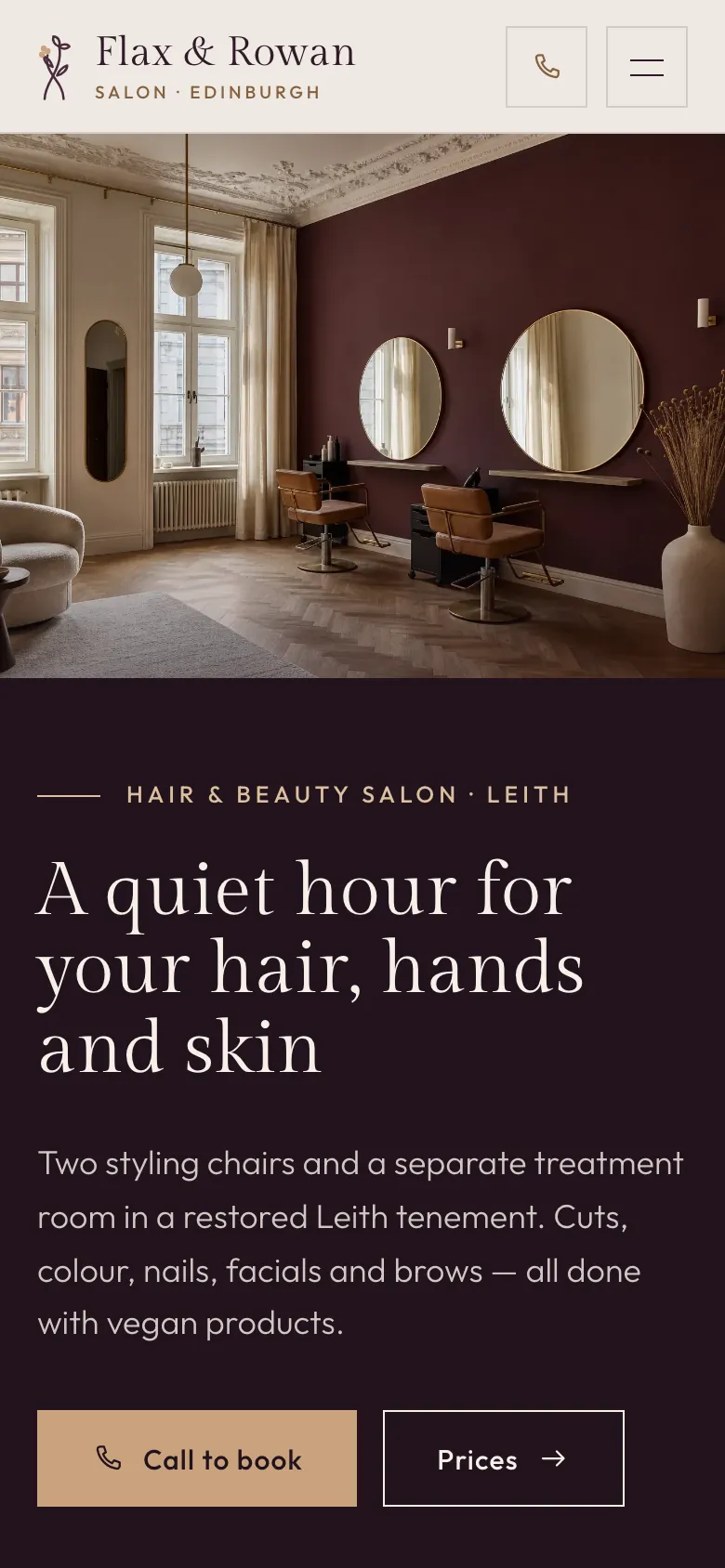
Flax & Rowan is a fictional business. This is what your business website could look like: several pages, your content, a mobile version. See the website live →

What to look for

What a good beauty or hair salon website needs

Salon clients usually know what they want: a colour, gel nails, a facial. On your website they check the price, how long it takes, who will do it and how to book.

Sample website of Flax & Rowan on a phone
  1. Price list with treatment times

    Women’s and men’s cuts, colour by hair length, manicure, pedicure, facials. A “from” price and an approximate duration let clients plan their visit. The agent carries over your price list item by item and never invents a price.

  2. Treatment descriptions

    What the treatment involves, how long it takes, who it’s for, contraindications and how to prepare. Factual, no promises to “take ten years off”. A well-described treatment is also easier to find on Google by its name.

  3. A booking button that opens your system

    If you take bookings through Booksy, Fresha or another booking app, the “Book now” button in the header goes straight to your profile there. Webomat doesn’t build its own booking system, so your calendar stays where you already run it and nothing gets double-booked.

  4. Team with names and specialities

    Who does colour, who does lashes, who runs the facials. Clients often come back for a specific person. Training and certificates you hold are worth showing; the agent won’t add any you don’t give it.

  5. A gallery of your work, with consent

    Real photos of hair, nails and make-up. Posting a client’s photo needs her consent, so pick photos you have permission for, or shots without faces. The agent takes the photos from your current website, and you can add new ones in the chat.

  6. Opening hours and phone number

    Hours on the homepage and a tap-to-call number, because some clients would rather phone than book in an app, especially for a first visit or an unusual treatment.

  7. Address, entrance and parking

    Full address as text, a link to navigation, the floor, nearby parking. If the salon is inside a shopping arcade or in a courtyard, one sentence on how to find it saves clients circling the building.

  8. Gift vouchers

    Say that you sell vouchers, for what amounts and how to buy them in the salon. If you want to sell paper vouchers online, posted to the client or collected in the salon, there is a separate shop package for that.

  9. Reviews: link to your profile

    Client reviews live on Google and in your booking app. Linking to them is more honest than a few hand-picked quotes, and Webomat doesn’t invent reviews; quotes appear only if they are on your current website.

  10. Structured data for your salon

    The schema.org type BeautySalon or HairSalon, with address, phone and hours matching your Google Business Profile. This helps search engines and AI assistants point to your salon when someone asks for a hairdresser or beautician nearby.

Common problems

What usually goes wrong on old salon websites

The salon lives in its booking app and on social media, while the website is stuck in opening week. A client who finds it on Google sees a different salon from the one she walks into.

  • Old site

    An outdated price list, or none at all

    Prices from two price rises ago, or “price on request” next to every treatment. Clients who want to compare simply leave. You type the current prices in the chat and the agent lays them out in clear tables.

  • Old site

    Treatments you no longer offer

    A service list from opening day and nothing about what’s new. Remove old items with one message in the chat, and add new ones with their price and duration.

  • Old site

    Booking hidden away

    The booking link is buried in the footer or only reachable from your social profile. On the new website the booking button sits in the header, on every page.

  • Old site

    A gallery you can’t view on a phone

    Stamp-sized thumbnails, a pop-up that doesn’t fit the screen, or a slideshow that scrolls by itself. The agent picks the photos that work, lays them out in the new design and checks the site on a phone screen before handing it over.

What you get

What the agent builds for a salon

The agent builds the site from the price list, descriptions and photos you already have. A typical set for a salon looks like this; add any missing pages in the chat.

  1. /

    Homepage

    Booking button, key services with “from” prices, the team, address and opening hours.

  2. /price-list.html

    Price list

    All services in tables by category, with price and duration.

  3. /treatments.html

    Treatments

    Treatment descriptions, and for a wider offer separate pages, e.g. colour or facials.

  4. /team.html

    Team

    Stylists, beauty therapists and nail technicians with a photo and their speciality.

  5. /gallery.html

    Gallery

    Work from your current website plus anything you add in the chat.

  6. /contact.html

    Contact and directions

    Address with navigation, opening hours, phone, booking link and a form whose messages go to your panel and your email.

On every page

  • Tap-to-call phone number
  • Mobile-friendly
  • Titles and descriptions for Google
  • schema.org structured data
  • Sitemap
  • 301 redirects

The $29 package covers up to 10 pages, the larger ones up to 25 or 50, enough for a page per treatment. Old addresses are redirected (301) to the new pages.

How it works

From old website to new - step by step

No briefs, meetings or weeks of waiting. The agent works with your real content, and you decide at every step.

  1. Step 01

    Snapshot and mini audit

    Paste the address and within a minute we capture your current site on desktop and mobile, count the pages and check SSL, speed and the mobile version. Free.

    ~1 min

  2. Step 02

    The agent reads your website

    It collects your real content, photos, logo and brand colours, recognises your industry, services and contact details - and never makes anything up.

    2-3 min

  3. Step 03

    Proposals in different styles

    You get 1, 3 or 5 homepage versions, each in a different direction: classic, bold or light. Pick the one that suits your business best.

    15–25 min

  4. Step 04

    Coding the full website

    The agent builds the subpages in the chosen style, connects the navigation and redirects old addresses (301) so you keep your Google rankings.

    usually 15–20 min

  5. Step 05

    Quality control

    Automated tests on mobile and desktop: nothing overlaps, links work, the site is light and accessible. The agent fixes issues before you see anything.

    on every version

  6. Step 06

    Changes and publishing

    Request changes in a chat - each one is a new version you can roll back. Connect your own domain with SSL or download the site as an HTML package.

    a revision takes ~10 min

Pricing

A full website for one fixed price

One package covers homepage proposals, building the full website and revisions. No hourly rates, no extra charge per page up to the limit.

Net prices, 23% VAT is addedGross prices, 23% VAT included

Full website — 1 version

One direction, polished straight away

$29$35.67netgross

$35.67 gross$29 net + 23% VAT

Get started
  • 1homepage version

  • 10pages

  • 3revision rounds

  • 5AI photos

  • SEO and GEO optimisation, 301 redirects
  • Revisions in a chat, in the same style
  • ZIP package to download

1 year free

  • Website hosting and maintenance
  • SSL certificate

Then $29 net per year, whatever the package.

Full website — 5 versions

5 different directions to choose from

$129$158.67netgross

$158.67 gross$129 net + 23% VAT

Get started
  • 5homepage versions

  • 50pages

  • 10revision rounds

  • 25AI photos

  • SEO and GEO optimisation, 301 redirects
  • Revisions in a chat, in the same style
  • ZIP package to download

1 year free

  • Website hosting and maintenance
  • SSL certificate

Then $29 net per year, whatever the package.
A bigger project?

Projects beyond the package are quoted individually.

Custom

Quoted for your project

Write to us
  • Websites with more than 50 pages
  • Large shops: thousands of products, wholesaler or ERP integrations
  • Bookings, logins and other back-end features

Full pricing

FAQ

Questions from salon owners

Can clients book an appointment on the website?

The website sends them where you already take bookings: the button opens your profile in Booksy, Fresha or another booking app. Webomat doesn’t build its own booking system with a calendar. Clients who prefer to write can use the contact form, whose messages go to your panel and your email.

Can I sell gift vouchers or products through the website?

On a standard website, vouchers are described as information: the amounts and how to buy them in the salon. Selling online with payment comes with the separate shop package for $129 or $259 net: catalogue, cart, payments (currently PayU, Przelewy24 and Tpay, plus bank transfer) and courier shipping, set up for selling in Poland (Polish payment gateways, prices in PLN). The shop sells physical goods, such as aftercare products or paper gift vouchers sent by post or courier or collected in the salon; it doesn’t send e-vouchers by email. If your website was already built with Webomat, you can add a shop to it for $129 net. You pay for the package once, with no subscription; after the first year, hosting a website with a shop costs $99 net a year.

How the Webomat shop works →

Can I show photos of my clients?

Yes, if they have agreed to their photo being published. The agent carries over the photos from your current website and any you add in the chat, and you can remove a photo you don’t want with a single message.

I change prices and add treatments often. Will I manage?

Yes, in the revision chat. You write in plain language, e.g. “add brow lamination, $45, 45 minutes”, the agent shows how it understood you, and after you approve it makes the change. Your package includes 3, 5 or 10 revision rounds, so it pays to bundle several changes into one message.

I have a hair salon and a beauty room at the same address. One website or two?

Usually one, with two sections in the menu and a separate price list for each. The agent proposes a layout based on your current website, and if you want it different, just say so in the chat. Two separate brands means two separate projects.

I don’t have a website, just a booking profile and Instagram. What then?

You describe the salon in a short conversation: services, prices, address, hours and your booking link. The agent builds the website from that, and you can add photos of your work and the interior in the revision chat.

Will the new website help me rank for “hair salon” plus my town?

It does what a website can do: services named the way people search for them, address and hours as text, salon structured data and a fast mobile version. Old addresses are redirected (301). Your position on Google Maps also depends on your Google Business Profile and its reviews, which a website can’t replace.

How much does a salon website cost?

A one-off $29, $99 or $129 net, depending on the number of homepage versions, revision rounds and pages. A year of hosting with SSL is included, then it’s $29 a year. The new website is in the same language as your current one. You see the first homepage version (one per account) for free before you pay anything.

From the blog

Worth reading before you start

See what your salon’s new website could look like.

Paste your website address and within a minute you will see how it looks on desktop and phone, how many pages it has and what is worth improving.

No card, no commitment.