

webomat

Website for a dental practice

from $29

Paste the address of your practice’s current website. The AI agent reads your treatments, fees, dentist profiles and photos, then designs and codes a new website: calm, clear and factual, with the reception phone number within reach on every screen.

A short chat and a free preview of your new website. No card needed.

No website yet? Tell us what you need - we’ll build it →

  • First homepage version free
  • Usually ready in 15–25 minutes
  • Hosting and SSL for a year included

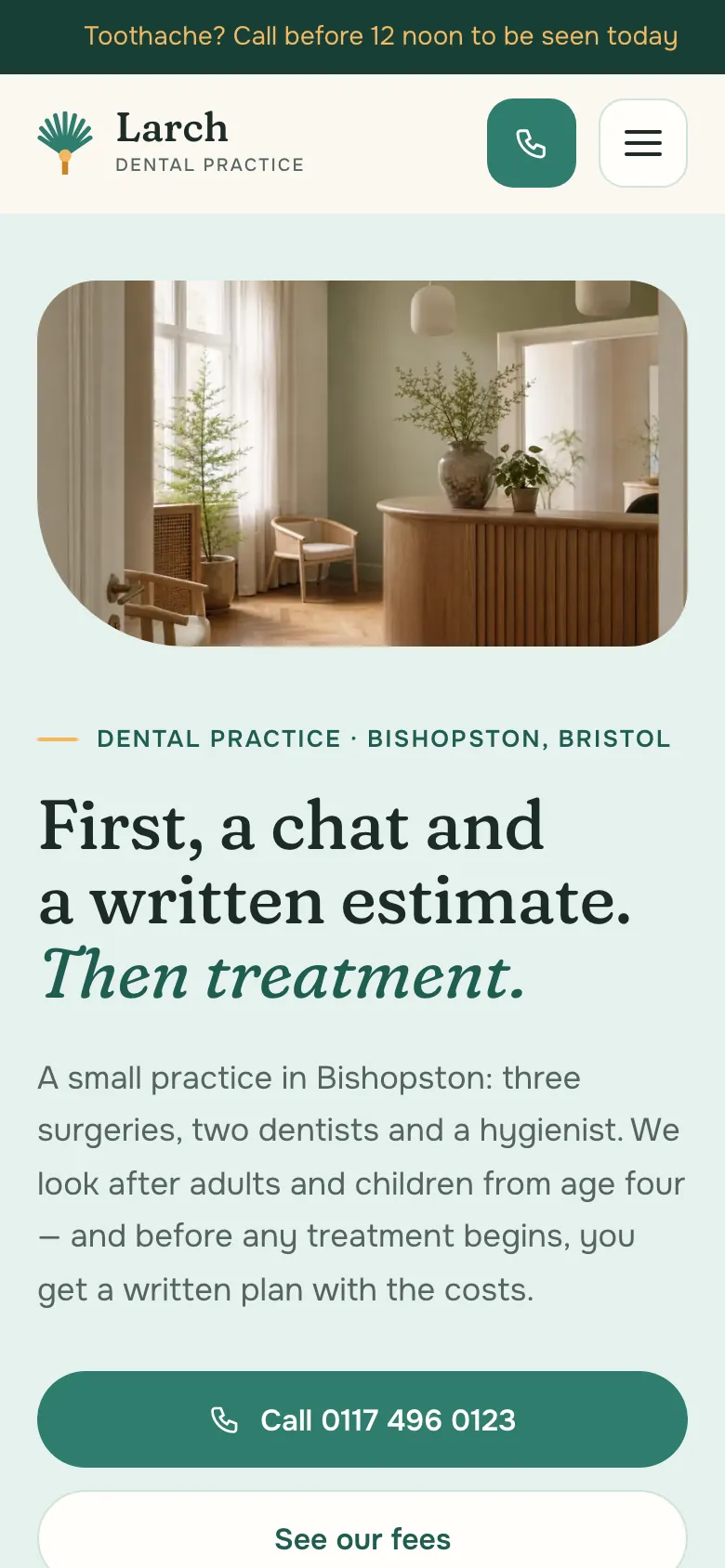
Sample website (fictional business)

Larch Dental is a fictional business. This is what your business website could look like: several pages, your content, a mobile version. See the website live →

What to look for

What a good dental practice website needs

Patients usually look for a dentist with a specific problem: a toothache, a lost filling, a child due for a check-up. The website should tell them quickly whether you treat it, what it costs and how to book.

Sample website of Larch Dental on a phone
  1. Reception phone number and opening hours

    The reception number in the header, tap-to-call on a phone, with reception hours next to it. If you see emergency patients without an appointment, say so plainly and explain how it works.

  2. Treatments named in plain language

    General and root canal treatment, prosthodontics, implants, orthodontics, oral surgery, children’s dentistry, hygiene. Each area with a short description of what it covers, and with a wider range its own page, because patients search Google for a treatment, not for “a full range of services”.

  3. Fees

    Check-up, filling, root canal treatment, hygiene appointment, crown: “from” prices or ranges, with a note on what the final cost depends on. Patients compare prices before they call, so a fee list saves reception time. The agent carries over your prices and never sets one itself.

  4. Dentists with real qualifications

    Full name, title, specialism, scope and days of work. Only the details you provide or that are on your current website: the agent does not add specialisms, training or academic degrees.

  5. Insurance and payment, where relevant

    Whether you accept dental insurance or treat patients under a public scheme, for which treatments and for whom, and what is private. It is one of the most frequent questions at reception. If the practice is private only, that is worth saying too.

  6. First visit and preparation

    What to bring (ID, previous X-rays, a list of current medication), how long the first appointment takes, how to cancel. A page like this cuts down on phone questions and pre-visit nerves.

  7. Information, not advertising

    Dental boards and regulators set professional rules on how practices may present themselves. The safe approach is to write factually: no “best dentist in town”, no guaranteed results, no comparisons with other practices and no promotional offers, and before-and-after photos only with the patient’s written consent. Check the rules of your own board or regulator.

  8. A form with minimal data

    The form is for arranging contact: name, phone or e-mail, a short message. No fields for symptoms, conditions or medication, because the GDPR and similar privacy laws treat health data as especially sensitive. Patients discuss the details with reception or the dentist. Messages go to your panel and your e-mail.

  9. Directions and access

    The address with a map link, floor, lift, parking, step-free entrance. For a parent with a small child or an older patient, this information decides whether they come to you.

  10. Dentist structured data

    A schema.org description with the Dentist type, address, phone and hours, consistent with your Google Business Profile. It helps search engines and AI assistants correctly answer the question of a dentist nearby.

  11. A calm, readable design

    Large type, strong contrast, a simple menu. Many patients read the website with a toothache or while hunting for their reading glasses. For dental practices the agent puts usability before effect: what patients come for is on the first screens.

Common problems

What usually goes wrong on old dental practice websites

A dental website is often built when the practice opens. Since then the dentists, fees and hours have changed, and the website has stayed the same.

  • Old site

    Dentists who no longer work there

    A patient calls asking for an appointment with a dentist who left two years ago. On the new website you update the team and their working days with one instruction in the chat.

  • Old site

    Advertising language

    Lines about “the best specialists” and “a guaranteed beautiful smile” are left over from old templates and are hard to square with professional rules for healthcare information. The agent writes briefly and factually, and you point out any phrases you don’t want in the chat.

  • Old site

    The fee list as a photo

    A photo of the price list from reception or a scanned PDF that can’t be read on a phone. On the new website the fee list is a text table, readable for patients and for Google. If your prices are only in an image today, you give them in the chat.

  • Old site

    A form that collects too much

    Fields for chronic conditions, medication and symptoms in an ordinary contact form mean health data sent by e-mail. The form on the new website is limited to what is needed to get in touch.

What you get

What the agent builds for a dental practice

The agent builds the website from information your practice already publishes. A typical set looks like this; anything missing, such as a first-visit page, you add in the chat.

  1. /

    Homepage

    Reception phone and hours on the first screen, treatments, dentists, address with directions.

  2. /treatments.html

    Treatments

    Areas of dentistry with a factual description, and with a wider range separate pages, e.g. endodontics or orthodontics.

  3. /fees.html

    Fees

    Prices from your website in a table that reads well on a phone, with a note on what the final cost depends on.

  4. /team.html

    Our team

    Dentists and hygienists with a photo, specialism and working days.

  5. /patients.html

    For patients

    First visit, preparation, insurance and payment where relevant, cancelling appointments.

  6. /contact.html

    Contact and directions

    Reception, address with a map, parking and access, a minimal-data form whose messages go to your panel and your e-mail.

On every page

  • Tap-to-call phone number
  • Mobile-friendly
  • Titles and descriptions for Google
  • schema.org structured data
  • Sitemap
  • 301 redirects

The $29 package covers up to 10 pages, the larger ones up to 25 or 50, enough for separate pages per treatment area. Old addresses are redirected (301) to the new ones.

How it works

From old website to new - step by step

No briefs, meetings or weeks of waiting. The agent works with your real content, and you decide at every step.

  1. Step 01

    Snapshot and mini audit

    Paste the address and within a minute we capture your current site on desktop and mobile, count the pages and check SSL, speed and the mobile version. Free.

    ~1 min

  2. Step 02

    The agent reads your website

    It collects your real content, photos, logo and brand colours, recognises your industry, services and contact details - and never makes anything up.

    2-3 min

  3. Step 03

    Proposals in different styles

    You get 1, 3 or 5 homepage versions, each in a different direction: classic, bold or light. Pick the one that suits your business best.

    15–25 min

  4. Step 04

    Coding the full website

    The agent builds the subpages in the chosen style, connects the navigation and redirects old addresses (301) so you keep your Google rankings.

    usually 15–20 min

  5. Step 05

    Quality control

    Automated tests on mobile and desktop: nothing overlaps, links work, the site is light and accessible. The agent fixes issues before you see anything.

    on every version

  6. Step 06

    Changes and publishing

    Request changes in a chat - each one is a new version you can roll back. Connect your own domain with SSL or download the site as an HTML package.

    a revision takes ~10 min

Pricing

A full website for one fixed price

One package covers homepage proposals, building the full website and revisions. No hourly rates, no extra charge per page up to the limit.

Net prices, 23% VAT is addedGross prices, 23% VAT included

Full website — 1 version

One direction, polished straight away

$29$35.67netgross

$35.67 gross$29 net + 23% VAT

Get started
  • 1homepage version

  • 10pages

  • 3revision rounds

  • 5AI photos

  • SEO and GEO optimisation, 301 redirects
  • Revisions in a chat, in the same style
  • ZIP package to download

1 year free

  • Website hosting and maintenance
  • SSL certificate

Then $29 net per year, whatever the package.

Full website — 5 versions

5 different directions to choose from

$129$158.67netgross

$158.67 gross$129 net + 23% VAT

Get started
  • 5homepage versions

  • 50pages

  • 10revision rounds

  • 25AI photos

  • SEO and GEO optimisation, 301 redirects
  • Revisions in a chat, in the same style
  • ZIP package to download

1 year free

  • Website hosting and maintenance
  • SSL certificate

Then $29 net per year, whatever the package.

A bigger project?

Projects beyond the package are quoted individually.

Custom

Quoted for your project

Write to us
  • Websites with more than 50 pages
  • Large shops: thousands of products, wholesaler or ERP integrations
  • Bookings, logins and other back-end features

Full pricing

FAQ

Questions from dental practice owners

Can patients book appointments online?

Webomat does not build booking systems with dentists’ schedules. Patients call with one tap or send a contact request through the form, which goes to your panel and your e-mail. If you use an external online booking system, the “Book an appointment” button can lead to it.

Will the content follow the rules for presenting dental services?

The agent writes factually: treatments, fees, qualifications, with no superlatives, promised results or comparisons with other practices. The practice is still responsible for what it publishes, so read the text before launch and, if in doubt, check with your dental board or regulator. You make any correction in the chat.

Can I show before-and-after photos?

Patient photos are health data, and makeovers easily cross the line between information and advertising. The agent will not add them on its own or create such photos. If you want to show them, do so only with the patient’s written consent and after checking that the format complies with your professional rules.

What about the GDPR and the contact form?

The form collects a name, e-mail or phone and a message, with no fields for medical data. Messages are kept in your Webomat panel and sent to your e-mail. The agent carries over your practice’s privacy notice and privacy policy from your current website, or you add them in the chat.

Will the agent add dentists’ specialisms or insurance details?

No. The agent works with the real content of your website: it can shorten and organise it, but it does not invent specialisms, certificates, equipment or the insurance and payment schemes you accept. Give this information in the chat and it will appear on the website exactly as written.

Can I change the fees and the dentists’ working days myself?

Yes, in the revision chat. You write what has changed, e.g. “from January Dr Smith works on Tuesdays and Thursdays”, the agent shows how it understood the request and makes the change once you approve it. Your package includes 3, 5 or 10 revision rounds.

Will we lose our Google rankings for “dentist” plus our town?

Page titles and descriptions are carried over, and every old address is redirected (301) to the closest new page. The new website has a sitemap, Dentist structured data and a mobile version. Your practice’s listing on Google Maps is not affected by the new website.

How much does a dental practice website cost?

A one-off $29, $99 or $129 net, depending on the number of homepage versions, revision rounds and pages. A year of hosting with SSL is included, after that it costs $29 a year. You see the first homepage version (one per account) for free.

From the blog

Worth reading before you start

See what your practice’s new website could look like.

Paste your website address and within a minute you will see how it looks on desktop and phone, how many pages it has and what is worth improving.

No card, no commitment.