
webomat

Website for a construction company

from $29

Paste the address of your company’s current website. An AI agent reads your services, project descriptions, site photos and contact details, then designs and codes a new site that shows clients what you have already built and encourages them to ask for a quote.

A short chat and a free preview of your new website. No card needed.

No website yet? Tell us what you need - we’ll build it →

  • First homepage version free
  • Usually ready in 15–25 minutes
  • Hosting and SSL for a year included

English version of a real Webomat project

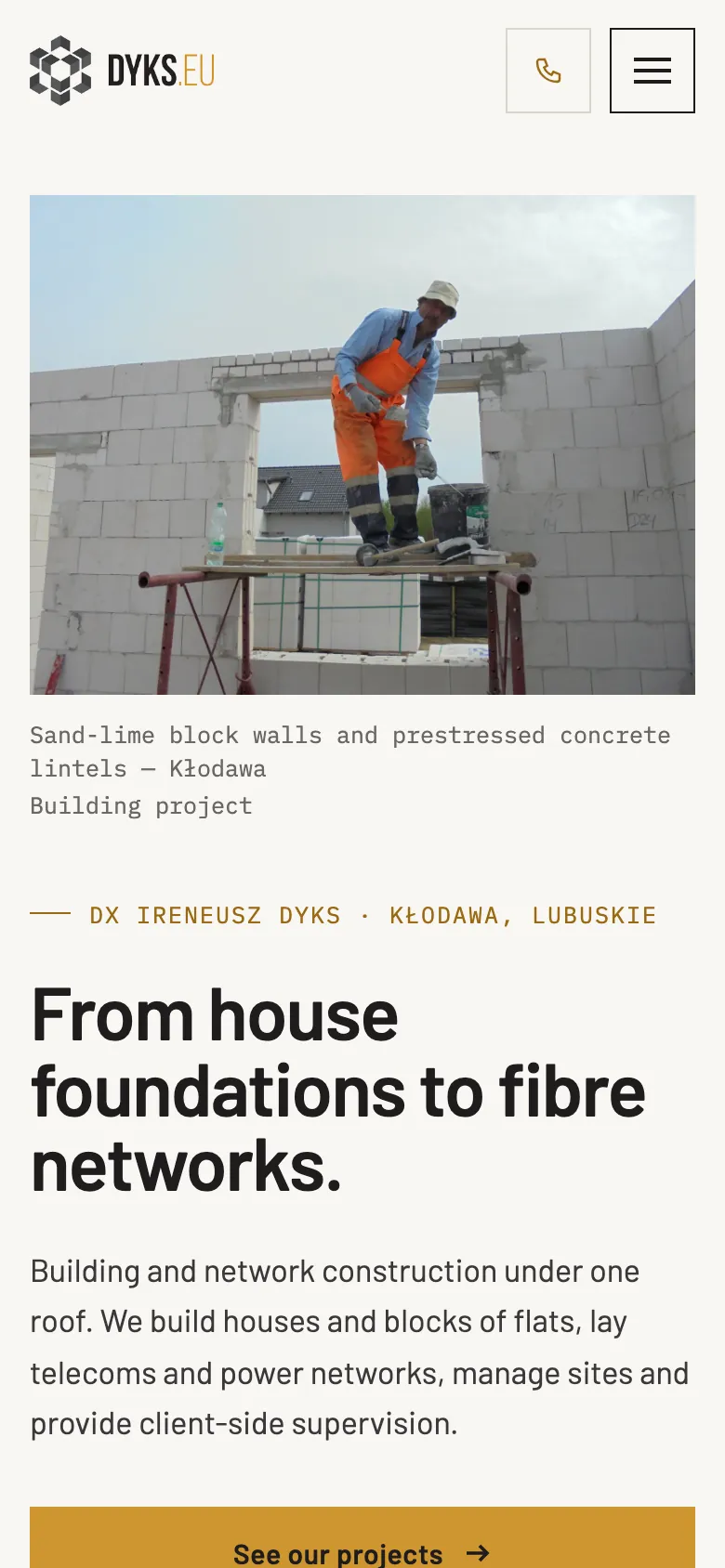
DX Ireneusz Dyks (dyks.eu) builds houses and telecom and power networks in western Poland. The agent redesigned its website; this is the new site translated into English. See the website live →

What to look for

What a good construction company website needs

A client, private or commercial, chooses a contractor for many months and a lot of money. Before they call, they want to check three things: what you build, where, and whether you have work to show for it.

Sample website of DX Ireneusz Dyks on a phone
  1. Contact in one tap

    Clients often call right after looking at your projects, from their phone. A number in the header with a tel: link, on every page, and next to it the name of the person who handles quotes, if you want to give it.

  2. Projects with the scope of work

    Not just a gallery but specifics: what building, where, what scope (for example shell and frame, roof, mechanical and electrical, interior finishing) and which construction method. For a client that is a stronger argument than a slogan about years of experience.

  3. Service area

    The towns, counties or regions where you take on work. A client at the other end of the region knows straight away whether to call, and search engines find it easier to connect your company with searches like “home builder” plus a county name.

  4. Services with specific names

    New home construction, shell builds, roofing, groundworks, interior finishing, industrial buildings as general contractor. Each service with a short description, and its own page for a broader offer, instead of a vague “comprehensive construction services”.

  5. A quote request form

    A few fields that save the first phone call: type of project, location, stage (design, permit, plot), planned timing. The request goes to your dashboard and your company inbox, so it won’t get lost.

  6. How working with you looks

    From the first conversation, through the site visit and estimate, to the contract, schedule and handover. A few plainly described steps take the uncertainty away, especially for someone building for the first time.

  7. Licences and certifications, real ones only

    Contractor licences, professional body membership, manufacturer certifications, liability insurance: with names and numbers, if you have them. The agent won’t add a certificate or a manufacturer’s logo that isn’t in your materials.

  8. References from clients

    Reference letters from companies and public bodies as downloadable files, and a client list if they agree to be named. For private clients, a link to your Google reviews is more honest than anonymous quotes. Webomat never invents reviews.

  9. Real photos from your sites

    Stages of work, equipment, finished buildings inside and out. A sharp photo from the site manager’s phone says more than a stock render. AI images never go into the project gallery: it only shows your own photos.

  10. Full company details

    The registered company name, company registration number, tax or VAT number and registered address. Businesses and public buyers check a contractor before inviting them to quote, and missing details raise doubts.

  11. Structured data for a construction company

    A description in schema.org format using the closest real type (for example GeneralContractor or RoofingContractor), with your address, phone and service area. Search engines and AI chats better understand what your company does and where it takes on work.

Common problems

What usually goes wrong on old construction company websites

A construction company usually has great material for a website: dozens of finished projects. On old websites that material simply gets lost.

  • Old site

    A gallery without captions

    A hundred thumbnails in one album and not a word about what was built, where, or the scope of work. The agent arranges the photos into projects with short descriptions, as long as the information is on your site or you give it in the chat.

  • Old site

    A one-paragraph business card

    “We have been in business for years and offer comprehensive services.” Google has nothing to index, and a client can’t tell whether you build houses or lay paving. The new site splits your offer into services, each with its own title and description for search engines.

  • Old site

    Photos weighing several megabytes

    Files straight from the camera that take forever to load on a phone. Photos you attach in the chat are converted by Webomat to the lightweight WebP format with metadata removed, and before delivery the site goes through a speed test.

  • Old site

    Just an email address instead of a form

    Clients have to open their email and work out what to write, so they put it off. A form with a few questions about the project shortens the path to an enquiry, and every message is also kept in your Webomat dashboard.

What you get

What the agent builds for a construction company

The agent builds the site from the content and photos already on your website. A typical set for a contractor looks like this; project descriptions that are missing you add in the chat.

  1. /

    Homepage

    What you do and where, selected projects, phone and a quote request button.

  2. /services.html

    Services

    Your scope of work with descriptions, and for a broader offer separate pages, for example new homes or roofing.

  3. /projects.html

    Projects

    Buildings with photos, location and scope of work; key projects as separate pages with a description.

  4. /about.html

    About us

    Company history, team, equipment, licences and registration details.

  5. /references.html

    References

    Reference letters to download and a link to your company’s Google reviews.

  6. /contact.html

    Quote and contact

    A quote request form, phone, office address and service area. Messages go to your dashboard and your inbox.

On every page

  • Tap-to-call phone number
  • Mobile-friendly
  • Titles and descriptions for Google
  • schema.org structured data
  • Sitemap
  • 301 redirects

The $29 package covers up to 10 pages. If your key projects should have their own pages, choose a package with 25 or 50 pages. Old URLs are redirected (301) to the new ones.

How it works

From old website to new - step by step

No briefs, meetings or weeks of waiting. The agent works with your real content, and you decide at every step.

  1. Step 01

    Snapshot and mini audit

    Paste the address and within a minute we capture your current site on desktop and mobile, count the pages and check SSL, speed and the mobile version. Free.

    ~1 min

  2. Step 02

    The agent reads your website

    It collects your real content, photos, logo and brand colours, recognises your industry, services and contact details - and never makes anything up.

    2-3 min

  3. Step 03

    Proposals in different styles

    You get 1, 3 or 5 homepage versions, each in a different direction: classic, bold or light. Pick the one that suits your business best.

    15–25 min

  4. Step 04

    Coding the full website

    The agent builds the subpages in the chosen style, connects the navigation and redirects old addresses (301) so you keep your Google rankings.

    usually 15–20 min

  5. Step 05

    Quality control

    Automated tests on mobile and desktop: nothing overlaps, links work, the site is light and accessible. The agent fixes issues before you see anything.

    on every version

  6. Step 06

    Changes and publishing

    Request changes in a chat - each one is a new version you can roll back. Connect your own domain with SSL or download the site as an HTML package.

    a revision takes ~10 min

Pricing

A full website for one fixed price

One package covers homepage proposals, building the full website and revisions. No hourly rates, no extra charge per page up to the limit.

Net prices, 23% VAT is addedGross prices, 23% VAT included

Full website — 1 version

One direction, polished straight away

$29$35.67netgross

$35.67 gross$29 net + 23% VAT

Get started
  • 1homepage version

  • 10pages

  • 3revision rounds

  • 5AI photos

  • SEO and GEO optimisation, 301 redirects
  • Revisions in a chat, in the same style
  • ZIP package to download

1 year free

  • Website hosting and maintenance
  • SSL certificate

Then $29 net per year, whatever the package.
Full website — 5 versions

5 different directions to choose from

$129$158.67netgross

$158.67 gross$129 net + 23% VAT

Get started
  • 5homepage versions

  • 50pages

  • 10revision rounds

  • 25AI photos

  • SEO and GEO optimisation, 301 redirects
  • Revisions in a chat, in the same style
  • ZIP package to download

1 year free

  • Website hosting and maintenance
  • SSL certificate

Then $29 net per year, whatever the package.

A bigger project?

Projects beyond the package are quoted individually.

Custom

Quoted for your project

Write to us
  • Websites with more than 50 pages
  • Large shops: thousands of products, wholesaler or ERP integrations
  • Bookings, logins and other back-end features

Full pricing

FAQ

Questions from construction company owners

We have hundreds of site photos. Will they all go on the website?

The agent picks the photos from your current site that look good and fit your projects, and places them with the project descriptions. You attach more in the revision chat, up to 6 files at a time, 20 MB each. A few well-described projects work better than a hundred similar shots that slow the site down.

Can we show projects without naming the client?

Yes. You describe a project with what you can disclose: type of building, town or county, scope of work, construction method. The client’s name and logo appear only if they are on your current site or you provide them.

How do I add a new project once a build is finished?

In the revision chat: attach the photos and write a few sentences about the building, the agent prepares a new entry in your projects and, once you approve, publishes the change. The site has no CMS admin panel. One round covers up to 15 changes at once; rounds never expire, and when they run out you can buy more.

Will the website help with tenders and requests for quotes?

It won’t replace tender documents, but buyers often check a contractor online. Full registration details, a list of projects with the scope of work and downloadable references in one place save you sending the same files with every bid.

We also build networks and roads, not just buildings. Can the site show that?

Yes. The agent builds the offer around what your company actually does: buildings, civil and infrastructure work, installations or project supervision can have their own sections and pages. That is how the DX Ireneusz Dyks website combines house building with telecom networks.

Will I lose my Google rankings for searches with my town’s name?

We carry over the titles and descriptions of your current pages and redirect (301) old URLs to the closest new pages. The new site gets a sitemap, structured data with your service area and a fast mobile version. Your Google Maps listing stays the same.

Can a client attach house plans to an enquiry?

The form on the site takes text, without attachments. The client describes the project and leaves contact details, then sends the plans by email when you call back. The request goes to your dashboard and your inbox, so you quickly see who is asking and about what.

How much does a website for a construction company cost?

A one-time $29, $99 or $129 net, with an invoice. The packages differ in the number of homepage proposals, revision rounds and pages. A year of hosting with an SSL certificate is included, and each following year costs $29 net. You see the first homepage version before you pay anything.

From the blog

Worth reading before you start

See how your projects could look on a new website.

Paste your website address and within a minute you will see how it looks on desktop and phone, how many pages it has and what is worth improving.

No card, no commitment.